How Do You Turn Auction Lot Photos Into a Clear Catalog Entry?
Follow an illustrative side table from its first photographs to a reviewed catalog entry, separating photo-based drafting from details you must inspect and verify.
To turn auction photos into catalog entries, group a complete photo set for each lot, generate a draft title, description, and estimate, then verify the details before export. Your photographs supply visible evidence; your inspection and review turn that evidence into a clear, supportable entry.
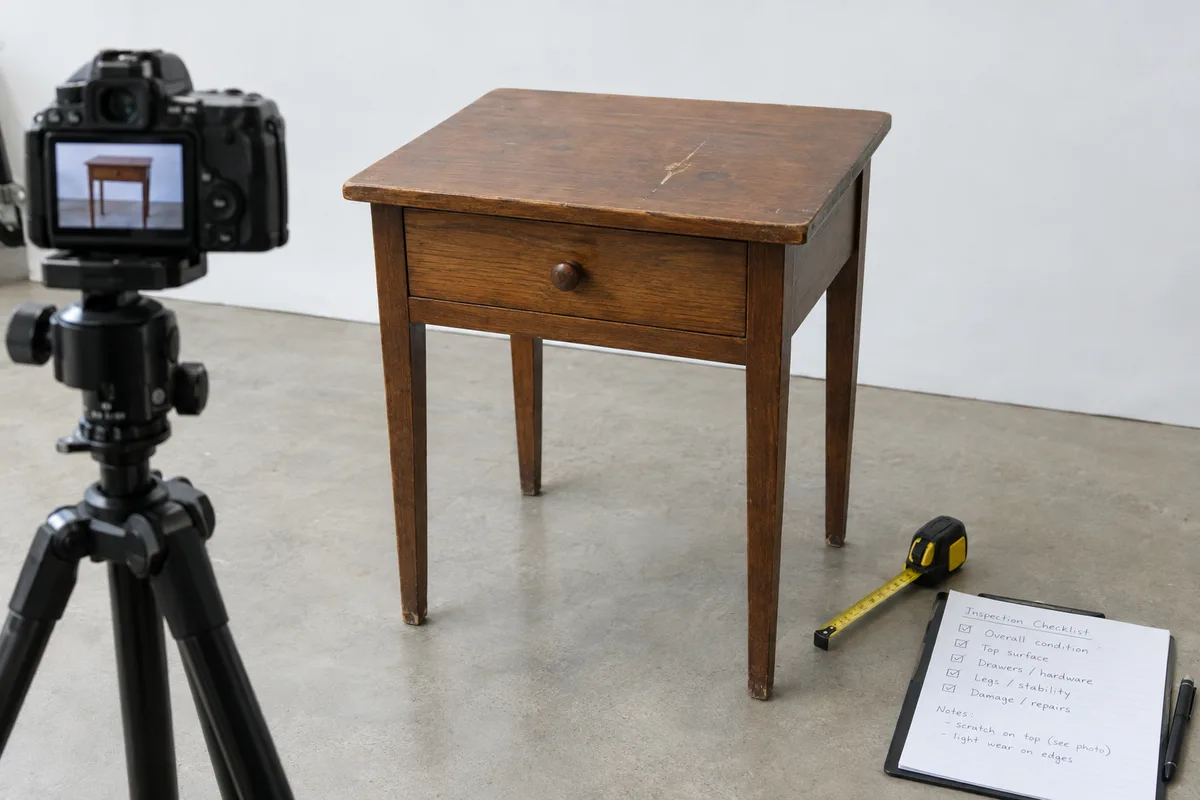
The example below follows one illustrative lot: a wood side table with a single drawer. Its measurements and inspection findings are hypothetical, included to show the workflow—not to identify or value an actual object. AuctionWriter’s AI cataloging software turns lot photos into draft titles, descriptions, and estimates, but you remain responsible for checking what the finished entry says.
How Do You Start With a Complete Photo Set for One Lot?
Start by deciding exactly what the buyer will receive. In this example, the lot contains one side table. A vase used to style the photograph is not included, so remove it before photographing the table rather than relying on a later disclaimer.
Build a photo set that shows the whole object and its relevant details:
- A clear overall view showing the top, drawer, and legs.
- Additional views of the back and sides.
- A view of the drawer open and, where safe, its construction.
- Photographs of the underside and any labels, marks, or inscriptions.
- Close-ups of visible wear, damage, repairs, or other condition concerns.
Keep the entire table visible in the main photograph. Use enough light to show surfaces without glare obscuring the finish. Detail photographs should supplement the overall view, not leave you guessing where a scratch or joint belongs.
Check the group before generating anything. A close-up from the next table can introduce a conflicting drawer pull, label, or condition detail. AuctionWriter organizes photos into lots; your photo-management workflow should still include a check that every image belongs to the correct object.
For this example, the photo set shows a rectangular top, one drawer, and four legs. It also shows a scratch on the top. It does not establish the wood species, age, maker, or stability of the joints.
How Do You Generate a Draft Title, Description, and Estimate?
Once the lot’s photographs are grouped correctly, use AuctionWriter to generate a draft title, description, and estimate. Treat the result as a starting point for review, not a substitute for examining the table.
A useful draft title for this example would be:
Wood Side Table With Single Drawer
That title identifies the object and a visible feature without adding an unsupported maker, date, or material attribution. A draft description could begin:
Wood side table with a rectangular top, single drawer, and four legs. A scratch is visible on the top surface.
This is deliberately limited. The photographs support the basic form and visible scratch, but they do not justify calling the table antique, identifying it as solid oak, or describing it as structurally sound.
Read the generated text against the photographs. If a draft introduces a maker, style period, wood species, or condition statement, ask what evidence supports it. Remove or qualify wording you cannot verify. Do not keep a confident phrase merely because it reads well.
Review the generated estimate separately. It is a draft estimate, not a verified finding. Compare it with your inspection, supported identification, and relevant auction results before approving it. No estimate amount is supplied for this hypothetical table because there is no actual inspection or comparable-sale evidence behind it.
What Verified Details Must You Add Beyond the Photographs?
Bring the draft back to the physical object. Photographs can show appearance, but you need direct inspection or reliable documentation for details they cannot establish.
For the illustrative table, assume your inspection records:
- Measurements: 28 inches high, 24 inches wide, and 18 inches deep.
- Drawer operation: The drawer opens and closes during inspection.
- Condition: A scratch is present on the top, and one rear leg joint is loose.
- Markings: No maker’s mark is observed on the surfaces inspected.
- Material identification: The wood species remains unconfirmed.
The loose joint is the important correction. It was not established by the photographs, but it belongs in the description once you discover it. Add a detail photograph if one can help show the affected area; do not expect the image alone to explain movement at a joint.
Be precise about the scope of your observations. “No maker’s mark observed on inspected surfaces” describes your inspection. “Unmarked” can imply a broader conclusion. Likewise, “drawer opens and closes during inspection” is more specific than “fully functional.”
Do not replace one uncertainty with another guess. If the wood species remains uncertain, retain “wood.” If you have not established an age or maker, leave those claims out. A shorter, supported entry is more useful than a detailed attribution you cannot substantiate.
How Does the Initial Draft Compare With the Reviewed Entry?
Compare the draft and reviewed entry side by side so you can see what changed and why. The following text illustrates the process; it is not a record of an actual AuctionWriter output or an inspected lot.
| Field | Illustrative initial draft | Entry after inspection and editing |
|---|---|---|
| Title | Wood Side Table With Single Drawer | Wood Side Table With Single Drawer |
| Description | Wood side table with rectangular top, single drawer, and four legs. Scratch visible on top. | Wood side table with rectangular top, single drawer, and four legs. Measures 28 in. H × 24 in. W × 18 in. D. Scratch to top; one rear leg joint is loose. Drawer opens and closes during inspection. No maker’s mark observed on inspected surfaces. Wood species unconfirmed. |
| Estimate | Generated estimate awaiting review | Held for review against inspection findings and relevant auction results; not approved for publication |
The title stays the same because inspection has not established a more specific identity. The description becomes more useful through measurements and condition findings, not through extra adjectives.
Notice that the reviewed description does not make the entire lot export-ready. The estimate remains unresolved. You can finish editing the text while still holding the lot out of the sale-ready export until your review is complete.
This distinction helps you avoid treating “draft generated,” “description reviewed,” and “lot approved” as the same milestone. Whatever tracking method you use, make the remaining work explicit.
What Should You Check Before Including the Finished Lot in an Export?
Before including the lot in an export, compare the physical object, photographs, and final entry once more. Your catalog-management workflow should end with a practical consistency check:
- Lot identity: The lot number, object, and photo group match.
- Scope: The entry accurately states what is included.
- Title: The object type is clear, without unsupported attribution.
- Description: Measurements, condition findings, and inspection notes are correct.
- Photographs: The overall view and relevant details belong to this lot.
- Estimate: You have reviewed and approved the amount and checked the currency.
- Outstanding work: No unresolved inspection or editing task affects publication.
For the example table, the loose joint must remain in the description, and the estimate needs approval before the lot joins the finished catalog. Once those checks are complete, review the exported content and its presentation in your destination platform before publication.
AuctionWriter exports sale-ready catalogs to platforms auction houses already use, including HiBid, Auction Flex, BidWrangler, Proxibid, Wavebid, and LiveAuctioneers. It is standalone cataloging software that sits in front of those systems—not a bidding, clerking, or payment platform.
The essential workflow is straightforward: photograph the lot completely, generate a draft, inspect what photographs cannot establish, correct the entry, and approve the finished lot before export. Automation supplies the first pass; your verified observations determine what buyers read.