Bulk Uploading Method: Create a Custom Auction Catalog Fast
Catalog at record speed with bulk uploading in AuctionWriter. Easily drag and drop images, and let AI handle organization and naming. Create a professional auction catalog with the power of AI.
What is bulk uploading?
Creating lots one by one is a tedious process. Bulk uploading refers to the ability to import many lots in a significantly shorter amount of time than the traditional cataloging process. No matter what camera or device you use to collect photos of your auction lots, using the bulk uploading method can accelerate the rate of catalog creation.
How to use the bulk uploading method
1. Gather photos of your auction items.
2. Locate the folder with all of your photos on your computer.
3. Open the folder in one window, and AuctionWriter in another.
4. Drag and drop images for your first lot into AuctionWriter.
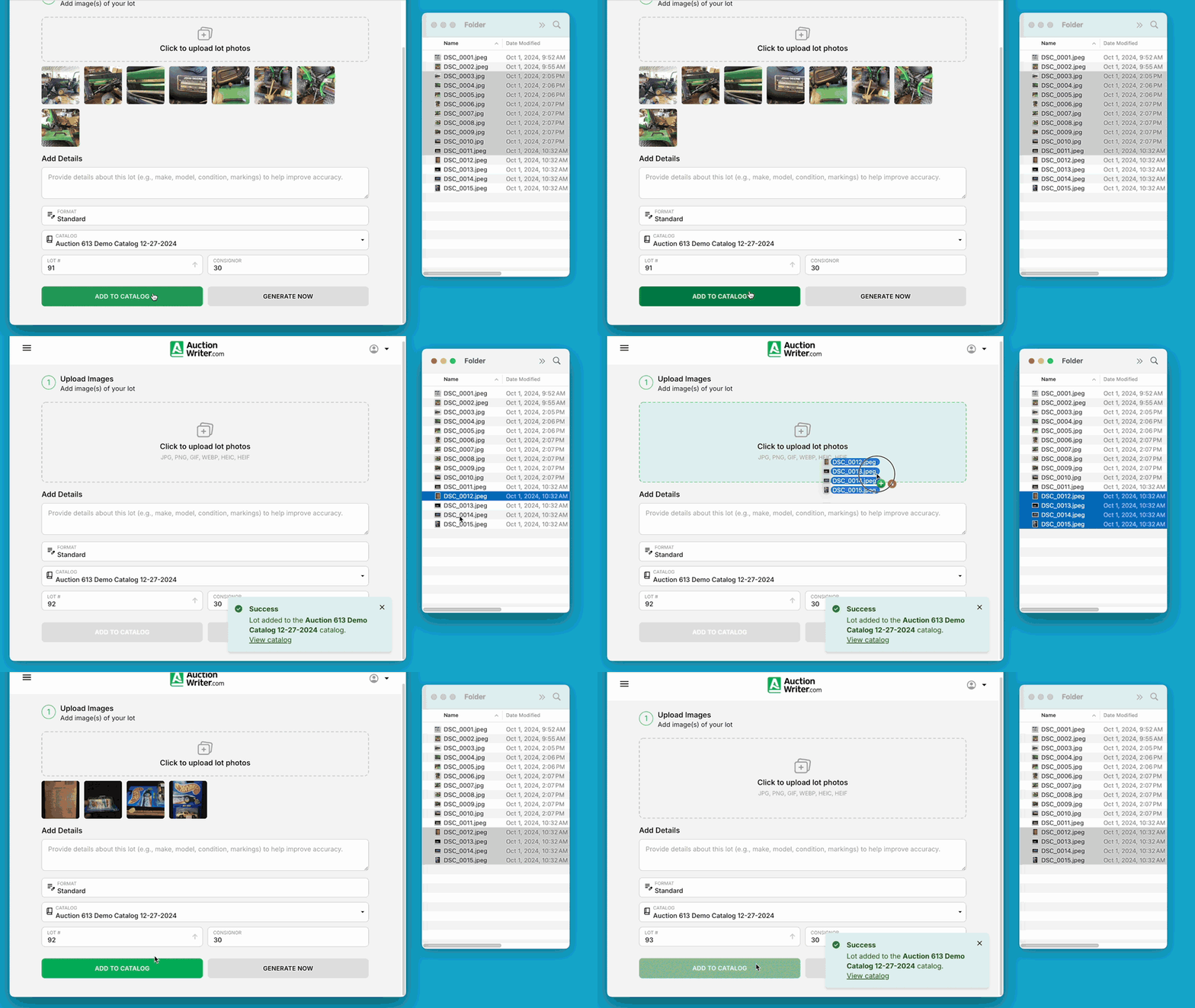
5. Click add to catalog.
6. Repeat steps 4 and 5 for all of your lots.
Tips
You do not need to name or organize images before uploading them to AuctionWriter. Our software will automatically name and organize images by lot number and format in a manner compatible with your preferred auctioneer software.